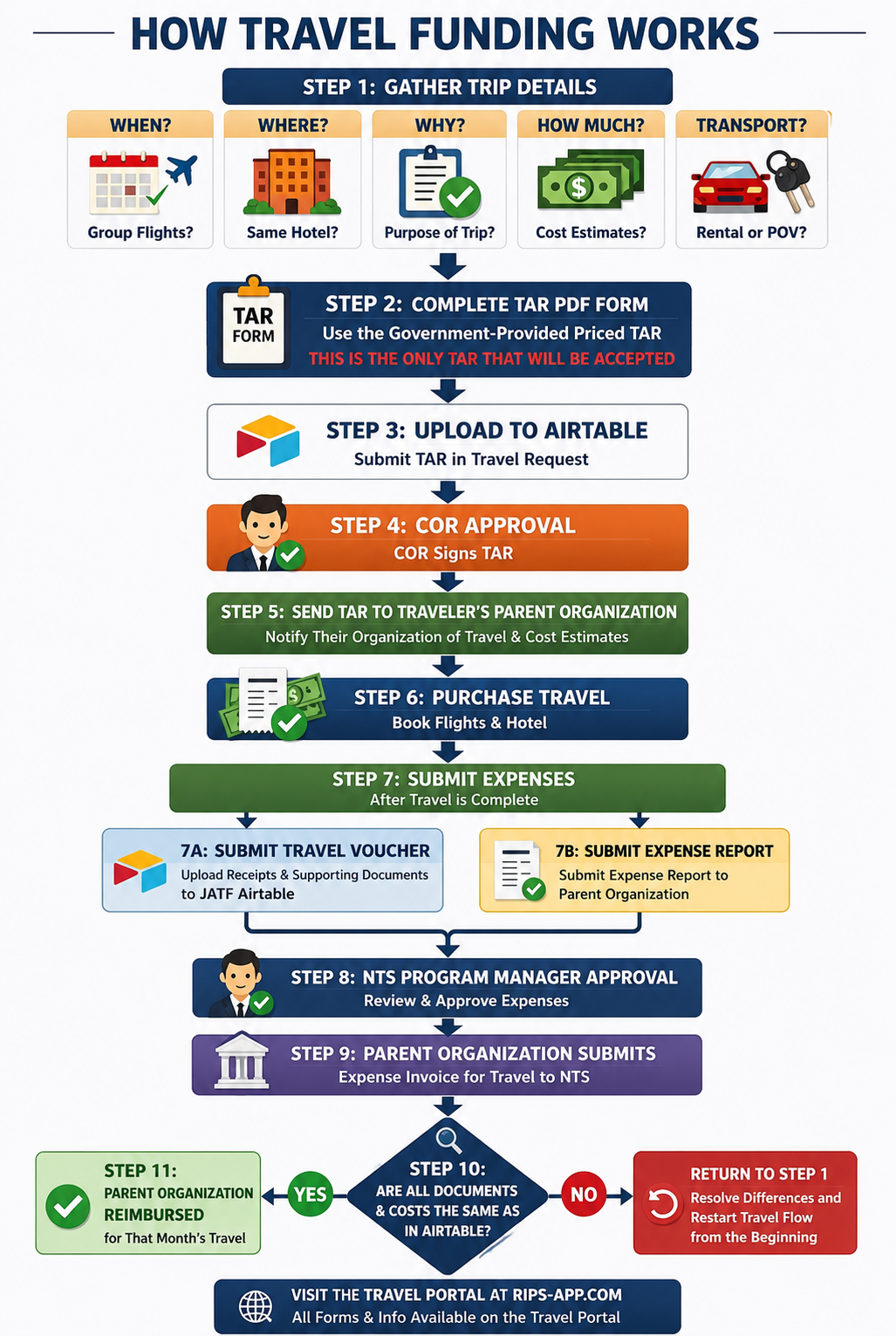
This page provides required instructions for submitting a Travel Authorization Request (TAR), receiving approval before travel, and submitting the required post-travel voucher documentation.
All travelers must complete the steps below. Travel must be approved before travel begins. A submitted request does not authorize travel until the required approval process is complete.
The priced TAR provided by the Government is the only TAR that will be accepted. Do not use self-generated, altered, recreated, beta, or unofficial TAR formats.
Failure to submit the correct priced TAR, supporting documentation, and post-travel voucher package may delay approval, reimbursement, or both.
Download and complete the priced TAR in step 1 (desktop Acrobat keeps the totals). Then submit here. No Java.
Open the submit form in a new tab if the form above does not load.
Use the status tracker below to confirm approval status and access signed TAR forms.
✅ Check Travel StatusIf you need to correct a TAR, download the file you originally submitted — not the AOR-signed copy. Edit it in desktop Acrobat, then resubmit in step 2.
Open the voucher form in a new tab if the form above does not load.
| Field | Instructions |
|---|---|
| Date of Request | Enter the date you are completing the form. |
| Org | Enter your organizational unit, for example JATF. |
| CONUS/OCONUS | Indicate if travel is within or outside the continental U.S. |
| Name of Traveler | Full legal name of the contractor traveling. |
| Traveler Email | Work email for TAR return and approval notices. |
| Company | Enter the contractor’s company name. |
| Field | Instructions |
|---|---|
| TDY Locations 1 to 3 | List up to 3 temporary duty locations in order. |
| Return | Indicate return to original location. |
| Departure/Arrival Locations | Provide airport or city names. These must match receipts. |
| Dates | Use MM/DD/YYYY format for each leg of travel. |
| Total Travel Days | Count travel and work days. |
| Total Non-Travel Days | Include weekends, holidays, or personal leave. |
| Field | Instructions |
|---|---|
| Purpose of Travel | Brief summary, for example “Prototype testing at SOCOM facility.” |
| Special Travel Justification | Include explanation for unusual costs or routes. Must include mission impact if not approved. |
Refer to the official GSA links below for rates and reimbursement policies:
| Category | Description | Notes |
|---|---|---|
| Airfare | Commercial air, economy only | Use lowest cost or contracted fare |
| Lodging Per Diem | Hotel nightly rate | Use actual rate unless over GSA cap with justification |
| Non-Travel M&IE | Meals and incidentals for full TDY days | Use GSA rates |
| Travel M&IE at 75% | First and last travel day | Per JTR §020304 |
| Car Rental | Economy class | Include fuel if not provided |
| Mileage | Personal car use | Use GSA mileage rate |
| Other | Baggage, parking, etc. | Itemize and justify |
| Indirect Costs | Contractor overhead | Only if pre-approved |
| Role | Requirement |
|---|---|
| Employee Request | Contractor prints name and signs |
| NTS Program Manager | Government PM signature |
| JATF COR/AOR | Contracting Officer or AO review |
| Vendor Leadership | Company representative, if required |
| Rule | Summary |
|---|---|
| Economy Travel Only | No business or first class unless medically required and approved |
| Per Diem Limits | Must not exceed GSA rates |
| TDY Duration | Per diem begins at 0001 local time on travel day |
| Receipt Threshold | Required for all expenses ≥ $75 |
| Split Travel Days | 75% of M&IE on first and last travel days |
| Rental Cars | Economy only, mission-related use |
| Non-Reimbursable | Alcohol, entertainment, room service, etc. |